
Working remotely from a catamaran in the Pacific comes down to three things: a Starlink plan that keeps working when you cross a border (Personal Maritime, US$185 a month, no 30-day clock), a power budget that covers a dish drawing 75 to 100 W all day, and a routine that accepts the connection will drop in heavy rain and cost real money on passage. We have done four seasons of it from Mā Tori between New Zealand and Fiji. The rest is the detail, every figure dated.
Two things first. We are not selling a lifestyle: some weeks the anchorage is the best office you will ever have, some weeks you are hand-steering through a squall line with a meeting in 40 minutes. And the prices below were right on 16 November 2026. Starlink changes them often, so check your own account before you cancel anything.
What the connection actually has to do
Most remote work is email, cloud documents and video calls, and only the calls are demanding. Zoom's own bandwidth requirements are a useful yardstick: 600 kbps up and down for a standard one-to-one video call, 1.2 Mbps each way for 720p, 3.8 Mbps up and 3.0 Mbps down for 1080p, and 2.6 Mbps up with 1.8 Mbps down for a 720p group call. Audio on its own is 60 to 80 kbps. A screen share without a video thumbnail is 50 to 75 kbps.
Those are small numbers next to what a dish delivers on a clear day in an empty anchorage. They matter on the other days. Starlink's own pages say the quoted speeds are maximums, not guaranteed, and slower when the network is busy. Budget for 720p, keep the camera off in heavy rain, and never book the call that matters for the hour you are entering a pass or picking up a mooring. The data is fine, the attention is the problem.
Our PredictWind and Starlink set-up guide covers the wifi side, and the PredictWind DataHub review covers the box that keeps the weather and the tracker running while you are in a meeting.
The plan: this is where most people get caught
Until August 2026 the answer was Global Roam. It is gone. The full story is in our guide to Starlink's 2026 rule changes for cruisers; the short version is that Roam Unlimited now stops after 30 consecutive days outside the country the account is registered in. For a boat that spends five months in Fiji and seven in New Zealand, that clock is the whole problem.
The plan that fixes it is Personal Maritime. Panbo's Ben Stein had the first report on 27 August 2026: US$185 a month, unlimited data in territorial waters worldwide, no 30-day limit except where local regulations force one, recreational boats only, applied for by support ticket with the vessel name, flag, length and registration. The length cap went from 40 ft to 60 ft on 5 September, which ISPreview covered. The terms are in our Personal Maritime explainer. If you work from the boat and the boat crosses borders, this is the plan.
The catch is distance from land. Inside 12 nautical miles the data is unlimited. Beyond it you are in Ocean Mode at US$6 a gigabyte, on Personal Maritime from day one and on Roam Unlimited since 27 September 2026. From Zoom's figures a 720p call hour works out at about half a gigabyte each way, call it a gigabyte an hour all up, so an offshore working day with three or four hours of calls is not a US$185 problem, it is a US$20 to 30 a day problem on top. Treat passages as offline days: weather files, messages home and one call if something breaks. The maths for sequencing a season around the clock is in our 30-day rule workarounds and still applies if you stay on Roam.
For a boat that stays in one country, Roam Unlimited is the simpler buy: NZ$235 a month on the New Zealand store on 16 November 2026, with a 100 GB Roam plan at NZ$100. The business maritime plans on the same site start at NZ$477 a month for 50 GB of Global Priority, which is not a cruising couple's plan.
The power budget, in watts you can check
Starlink publishes the draw, so use their numbers, not the forum ones. The Standard kit spec sheet gives an average of 75 to 100 W. The Mini spec sheet gives 25 to 40 W average on a 12 to 48 V DC input rated at 60 W. Both are IP67, rated for minus 30 to 50 degrees C and for 96 km/h of wind.
The arithmetic for a working day: eight hours on a Standard dish is 600 to 800 Wh, or 50 to 65 Ah out of a 12 V bank. Leave it on for 24 hours and it is 1.8 to 2.4 kWh, 150 to 200 Ah, most of a 400 Ah bank before anyone has made a coffee. The Mini over eight hours is 200 to 320 Wh. Add a laptop at 60 W for eight hours, 480 Wh, and a working day on the Standard dish lands around 1.1 to 1.3 kWh.
Against that, Mā Tori carries 700 W of solar and 540 Ah of lithium with a 2000 W inverter, the set-up on the for-sale page. On a clear Fijian day 700 W of panels makes several times that on paper. A week of overcast in the Bay of Islands in October is a different conversation, and that is when we would turn the dish off at night. Three habits that cost nothing: power the dish from DC rather than through the inverter where the kit allows it, turn it off when the working day ends, and run the laptop on a 12 V adaptor instead of the mains brick.
Where it still falls over
- Heavy rain. Starlink says the hardware is built for sleet, heavy rain and high wind. Expect a proper tropical downpour to make the call choppy all the same. Mute, camera off, carry on with audio, and move the call you cannot afford to lose around the squall line on the radar.
- The passage. Beyond 12 nautical miles every gigabyte is US$6. Fiji to New Zealand is about 1,100 nautical miles and seven to ten days, so tell the team you are offline and mean it. The Fiji to New Zealand passage guide has the timing.
- Time zones. Fiji and New Zealand sit 12 to 13 hours ahead of UTC. A Sydney morning meeting is late morning on the boat, a London afternoon is the middle of your night, a US west coast 9 am is 4 or 5 in the morning in Fiji. Pick clients whose hours you can live with.
- The haul-out. Personal Maritime is not for use on land, and nobody we have read has a clear answer on a boat in a yard or a cyclone pit for three months. If the boat spends cyclone season ashore, plan on Roam or a local SIM for that stretch; the cyclone season plan has the dates.
- Backup. One dish is one point of failure. A phone with a local SIM covers most anchorages near a town, and Mā Tori carries Iridium for the rest, text and voice only.
The visa and tax side nobody mentions
Working on a laptop for an employer at home while you sit on a visitor visa is a grey area in most countries. New Zealand has made it black and white. Immigration New Zealand's page on working remotely on a visitor visa says visitor visas applied for on or after 27 January 2025 allow remote work for an employer or clients outside New Zealand, with no limit on how much. You cannot work for a New Zealand employer or trade work for goods and services with a New Zealand business. Tax can apply past 92 days in a 12 month period, or 183 days where your home country has a tax treaty with New Zealand, and the days need not be consecutive.
For Fiji we are not going to give you a rule, because we are not qualified to and the rules move. Ask Fiji Immigration before you work from a Fijian anchorage. If you are buying a boat in New Zealand to do this from, the New Zealand buying guide covers the paperwork that sits alongside it. The visa and tax lines here are a signpost, not advice. Check the current official source.
Setting the boat up as an office
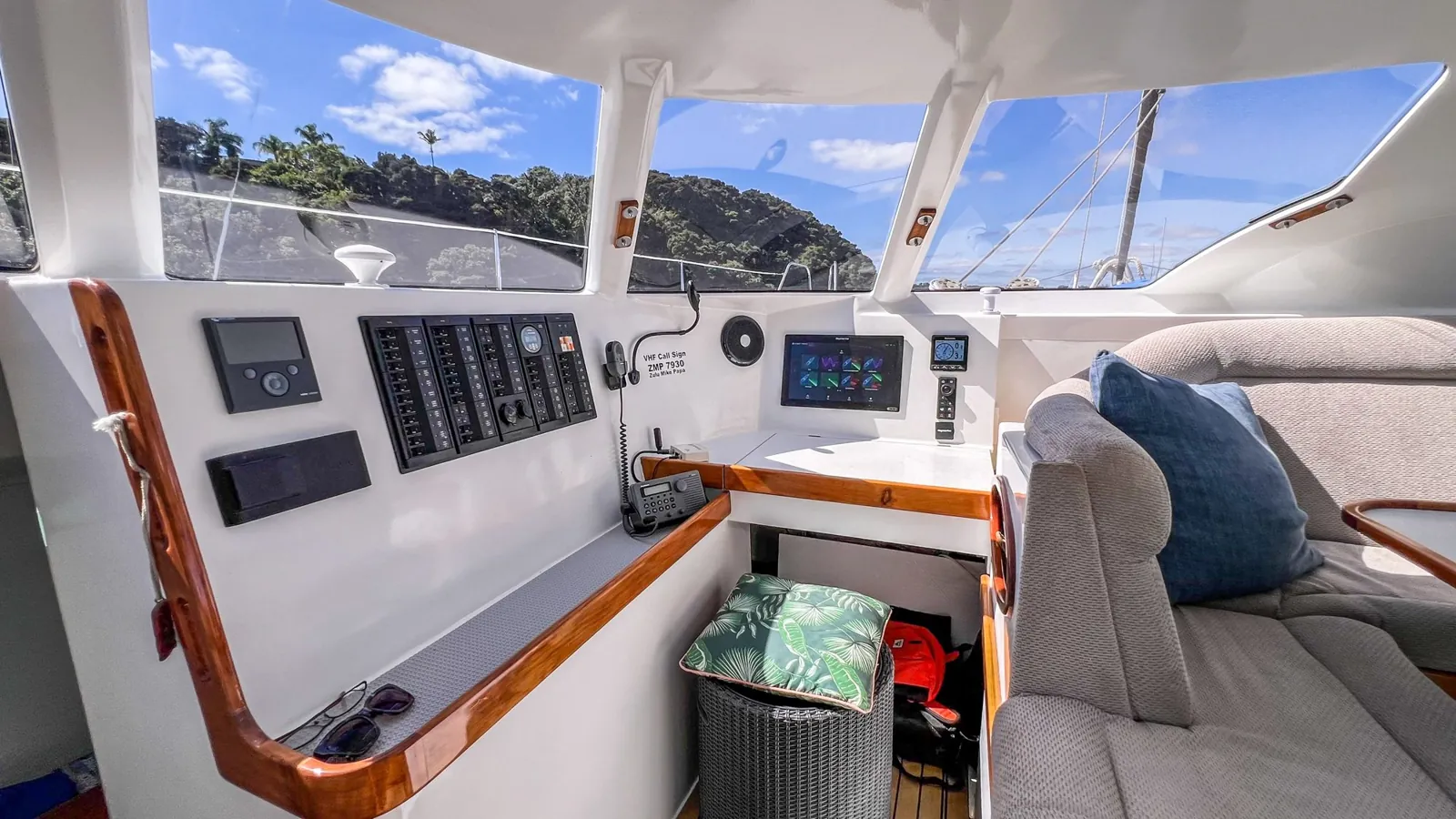
Keep it boring. A dry seat with a back, on a Fusion 40 the nav station or the saloon table, a 12 V laptop supply, a headset that works in wind, and the dish mounted where the boom and davits do not shadow it. The Starlink app shows the obstruction map, use it before you drill anything.
If the plan is to earn from the boat as well as on it, crew passages are how we do it, and the Offshore Starlink Playbook is the free PDF of our connectivity set-up.
Questions people ask about working from a boat
Can you work remotely from a sailboat with Starlink?
Yes, within reason. We have done four seasons of it from a Fusion 40 between New Zealand and Fiji. Calls, email and cloud work are fine at anchor on any Roam or Personal Maritime plan. Beyond 12 nautical miles you pay US$6 a gigabyte in Ocean Mode, and Starlink says speeds are not guaranteed, so plan the meetings for the anchorage, not the passage.
Which Starlink plan is best for working from a boat in the Pacific?
For a boat that crosses borders, Personal Maritime: US$185 a month, unlimited data within 12 nautical miles of a coast anywhere, no 30-day clock, recreational boats to 60 ft, applied for by support ticket. A boat that stays in one country can use Roam Unlimited, NZ$235 a month on the New Zealand store on 16 November 2026, but it stops after 30 consecutive days abroad.
How much power does a Starlink dish use on a boat?
Starlink's spec sheets give the Standard kit 75 to 100 W average and the Mini 25 to 40 W on a 12 to 48 V DC input. Over an eight hour working day that is 600 to 800 Wh for the Standard, about 50 to 65 Ah from a 12 V bank, before the laptop. A 700 W solar array covers it on a clear day; a week of rain does not.
Can I work remotely in New Zealand on a visitor visa?
Immigration New Zealand says visitor visas applied for on or after 27 January 2025 allow remote work for an employer or clients outside New Zealand, with no limit. You cannot work for a New Zealand employer on it. Tax can apply past 92 days in 12 months, or 183 days under some tax treaties. Check the current Immigration NZ and Inland Revenue pages first.
Keep reading: Starlink Personal Maritime explained, the 30-day rule workarounds, connecting PredictWind to Starlink, and the boat all of this was worked out on, a bluewater catamaran for sale in New Zealand.